 PeckBoard
Configuration
PeckBoard is configured entirely through command-line flags — there is no config file. Everything it stores lives in a single data directory, so a backup is a copy of one folder. This page covers the flags, how accounts work, how models are chosen, and where data lives.
Command-Line Flags
Started with no flags, the server listens on HTTP port 3344 and HTTPS port 3345, binds to all interfaces, and keeps its data in ~/.peckboard. Each of those can be changed:
peckboard --port 8080 --https-port 8443 --data-dir /var/lib/peckboard
| Flag | Default | Description |
|---|---|---|
--port |
3344 |
HTTP port |
--https-port |
3345 |
HTTPS port |
--host |
0.0.0.0 |
Bind address |
--data-dir |
~/.peckboard |
Data directory; also settable via the PECKBOARD_DATA_DIR environment variable |
--reset-password |
— | Generate a new password for a user, print it, and exit; add --user <name> when more than one user exists |
--mdns |
off | Advertise the server on the local network via mDNS; also PECKBOARD_MDNS=1 |
--keep-alive-hours |
1 |
Hours between provider login keep-alive pings, which exercise each saved login so tokens don’t go stale; 0 disables; also PECKBOARD_KEEPALIVE_HOURS |
--provider-send-timeout-secs |
300 |
Time budget in seconds for one full agent turn of a plugin-provided provider; also PECKBOARD_PROVIDER_SEND_TIMEOUT_SECS |
--restore-from <FILE> |
— | Restore a backup archive into the data directory and exit; refuses to overwrite an existing database unless --force is also given |
--force |
— | Allow --restore-from to overwrite an existing database |
--desktop |
off | Open a native window on http://127.0.0.1:<port> after the server binds; also PECKBOARD_DESKTOP=1. Headless peckboard is unchanged. Linux desktop builds need WebKitGTK. |
--install-desktop-entry |
— | Linux: write ~/.local/share/applications/peckboard.desktop and the app icon, then exit |
HTTPS uses a self-signed certificate that PeckBoard generates into the data directory on first start and renews automatically, so browsers warn on first visit. Set RUST_LOG (for example RUST_LOG=debug) to change log verbosity.
Authentication
On its first start PeckBoard creates one admin account, named admin, with a random password, and prints both to the terminal in a banner. The password is shown only that once — save it. If it is lost, generate a new one:
peckboard --reset-password
# prints admin:<new-password> and exits
Sign in with those credentials in the web UI. There is no self-service registration: an admin creates further accounts from Settings → Administration → Users, choosing a username, password, and a role of user or admin. Any signed-in user can change their own password from the avatar menu in the bottom-left; an admin can reset another user’s password, which also signs that user out everywhere.
Scripted setups: choosing the first account's credentials
Two environment variables override the first-run defaults, useful when provisioning a server non-interactively:
PECKBOARD_BOOTSTRAP_USERNAME=alice \
PECKBOARD_BOOTSTRAP_PASSWORD='<choose-a-strong-password>' \
peckboard
They take effect only on a first start with an empty database. The credential banner’s last line is a machine-readable username:password, so peckboard | tail -1 captures it in scripts.
Models
Every conversation in PeckBoard — a session — runs on a model. A model id names a provider and a model joined by a colon: claude:claude-opus-5 drives the Claude Code CLI with Opus 5, while mock:happy-path runs one of the built-in mock models. The Providers page covers every provider — the CLI each one drives, its models, and its sign-in flow.
A mock model is a fake agent: instead of talking to a provider, it replays a fixed script of events — some text, a tool call, a completion — identically on every run. Mock models exist for tests and demos. They let you try the UI, record a reproducible demo, or run the end-to-end test suite with no provider installed and at no API cost. For real work, pick a model from a real provider.
You choose a model when creating a session; the dropdown groups models by provider — Claude, Codex, Grok, Kimi, Cursor, Ollama, Mock — with Server default at the top. An existing session can be switched from the model button in the chat toolbar. Projects have their own model setting, used for the worker sessions they spawn, and a card can override its project’s choice.
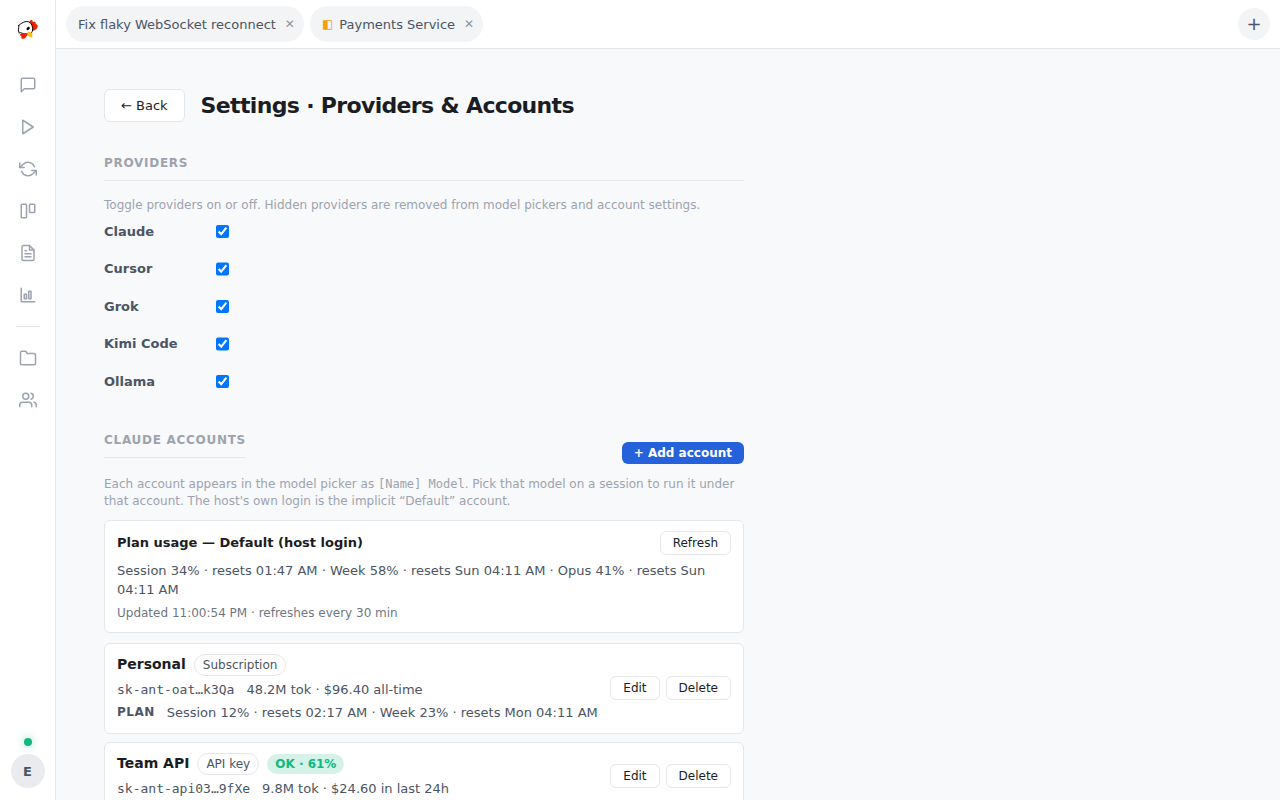
Providers and their accounts are managed in Settings → Connections → Providers & Accounts: toggle a provider off to hide its models everywhere, sign in Claude, Codex, Grok, and Kimi accounts (each then appears in every model picker as [Name] Model, with optional per-account budgets), and configure Ollama servers and the Cursor CLI. The same page shows the Claude subscription plan usage the claude /usage command reports.
Available models
The Claude provider seeds these models (use as claude:<id>, or bare — a bare id defaults to the Claude provider), then live-discovers what your installed CLI actually offers:
| Id | Display name |
|---|---|
claude-fable-5-1 |
Claude Fable 5.1 |
claude-opus-5-5 |
Claude Opus 5.5 |
claude-fable-5 |
Claude Fable 5 |
claude-opus-5 |
Claude Opus 5 |
claude-opus-4-8 |
Claude Opus 4.8 |
claude-opus-4-7 |
Claude Opus 4.7 |
claude-opus-4-6 |
Claude Opus 4.6 |
claude-sonnet-5 |
Claude Sonnet 5 |
claude-sonnet-4-6 |
Claude Sonnet 4.6 |
claude-haiku-4-5 |
Claude Haiku 4.5 |
If any of the environment variables ANTHROPIC_DEFAULT_OPUS_MODEL, ANTHROPIC_DEFAULT_SONNET_MODEL, or ANTHROPIC_DEFAULT_HAIKU_MODEL is set to an Amazon Bedrock model ARN, that model is added to the list as well.
The mock provider offers one model per scripted scenario (use as mock:<id>):
The mock provider offers one model per scripted scenario (use as mock:<id>):
| Id | Scenario |
| ——————- | —————————————————————————————————————– |
| echo | Echoes your message back as a text event |
| happy-path | Text, a tool call, more text, then a clean completion |
| tool-use | A single tool call, then completion |
| markdown | Text exercising markdown rendering |
| ask | Asks you a question and waits for the answer |
| plan-review | Thinking, then saves a plan the way the propose_plan tool does |
| usage | A turn with file-read, file-edit, and expert tool calls plus a deterministic usage event, for the usage dashboard |
| ctx | Reports the context occupancy you type as the message (default 160000), driving the context banner |
| block | Prints one line, then blocks until interrupted |
| crash | Text, then a simulated agent crash |
| tool-orphan-crash | A tool call that never finishes, then a crash |
Data Storage
All state lives in the data directory — ~/.peckboard unless --data-dir or PECKBOARD_DATA_DIR says otherwise. The database is a single SQLite file at <data-dir>/peckboard.db; users, sessions, projects, cards, and event history are all in it. No external database or service is involved, so backing up an install means stopping the server and copying the directory — or downloading a backup archive from Settings → Administration → Data (admins only) and restoring it later with peckboard --restore-from <file>, adding --force to overwrite an existing database.
What else is in the data directory
| Path | Contents |
|---|---|
peckboard.db |
The SQLite database |
jwt_secret |
Signing secret for login tokens, generated on first start |
certs/ |
Self-signed TLS certificate and key |
vapid_keys.json |
Keys for web push notifications |
attachments/ |
Files uploaded to sessions |
reports/ |
Markdown reports written by agents |
worker-mcp/ |
Per-session configuration consumed by the Claude CLI |
plugins/ |
Drop-in directory for WASM plugins, empty by default |