 PeckBoard
UI Gauge
UI Gauge scores UI design quality against baselines you rank yourself, and runs a generate-rate-learn loop that distils your ratings into a living style prompt agents apply whenever they build UI. It adds a sidebar page with the baseline gallery, the learned prompt, and the evaluation history.
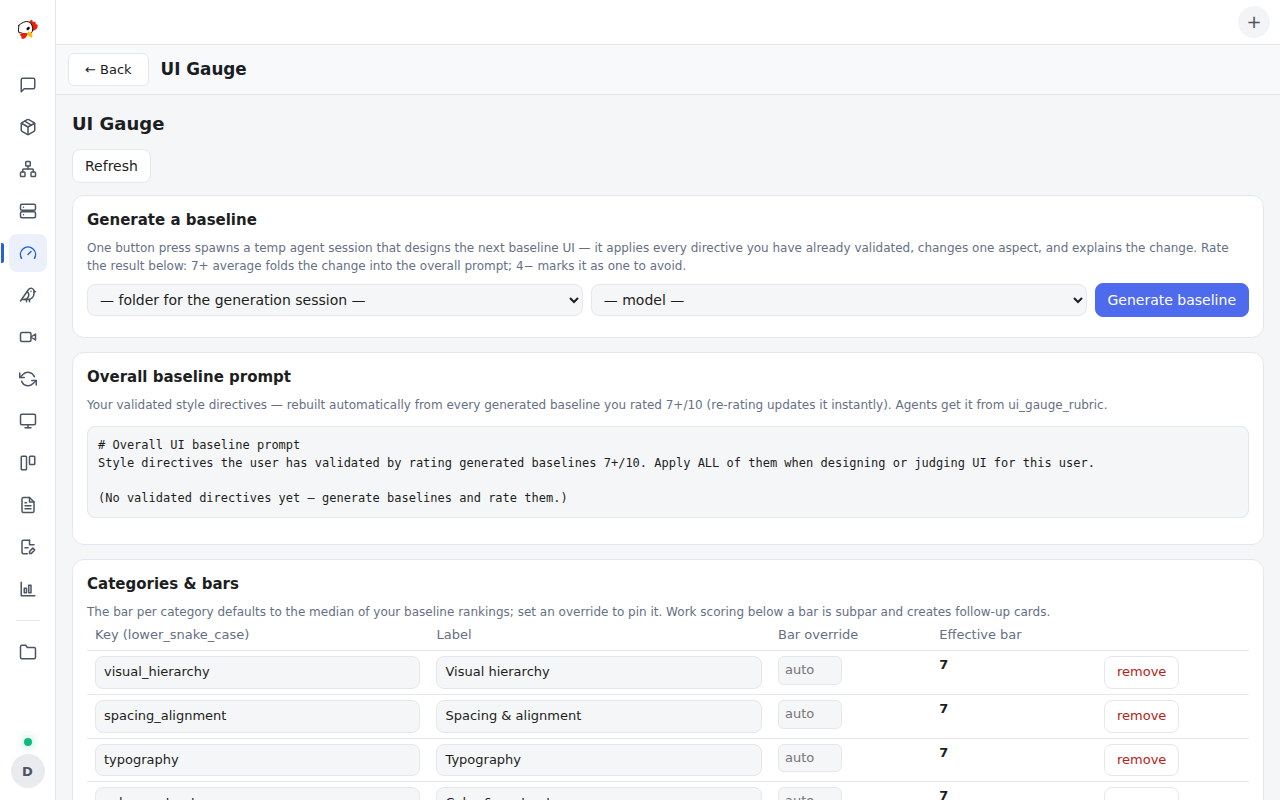
The learning loop: pick a folder and model and press Generate baseline. A temporary agent session designs one self-contained HTML page, changing one aspect versus previous baselines, and submits it with a change_summary phrased as a reusable style directive. The page renders in a script-less sandboxed frame in the gallery, and you rank it 1–10 per category. An average of 7 or above graduates its change summary into the overall baseline prompt; 4 or below lists it as something to avoid next generation. Re-rating or deleting a baseline updates the prompt instantly, and agents receive it from ui_gauge_rubric.
The scoring loop: upload screenshots of UI you consider good (or bad) and rank them per category — visual hierarchy, spacing and alignment, typography, color and contrast, consistency with the app, and accessibility by default, all editable, each with a passing bar derived from your rankings. A vision-capable agent then calls ui_gauge_rubric, fetches an anchor image or two, scores its target on your scale, and submits with ui_gauge_score. Any category below its bar makes the verdict subpar and automatically files one follow-up card per gap in the caller’s project. The plugin never looks at pixels itself — the agent is the eyes; the plugin owns the rubric, verdicts, history, and cards.
| Tool | What it does |
|---|---|
ui_gauge_rubric |
The categories with bars, your ranked baselines, and the overall baseline prompt |
ui_gauge_baseline_image |
Fetches one baseline screenshot by id, for calibrating against your scale |
ui_gauge_score |
Submits per-category scores; below-bar categories yield subpar and follow-up cards |
ui_gauge_history |
Recent evaluations with score trends, optionally filtered by target |
ui_gauge_submit_baseline |
The generation session’s hand-in: one self-contained HTML page plus its style directive |
Hooks, permissions, and prerequisites
Hooks: mcp.tool.invoke, timer.tick (WASM has no clock — evaluations are stamped with the last tick), session.agent.ended, http.request.before, http.request.authed. Permissions: provide_mcp_tools, data_store, user_authority, contribute_sidebar, session_write, session_dispatch, models_read.
Generation needs a configured AI account; scoring needs a vision-capable model. No settings — categories, bars, and baselines are all page state.