 PeckBoard
Providers
A provider is the backend that runs a session’s agent — usually by driving a coding CLI installed on the host, sometimes over HTTP. PeckBoard ships seven first-party providers as built-in plugins, and two more routes for anything else: the OpenAI-Compatible Provider plugin and the WASM provider API. Every model id carries its provider as a prefix, provider:model — claude:claude-opus-5, ollama:qwen2.5-coder — and a bare id defaults to claude:.
| Provider | Drives | Sign-in |
|---|---|---|
| Claude | The Claude Code CLI (claude), streaming JSON |
Host claude login, plus OAuth accounts in Settings |
| Codex | The OpenAI Codex CLI (codex exec --json) |
ChatGPT device-code flow in Settings → Codex Accounts |
| Cursor | The cursor-agent CLI in print mode |
cursor-agent login on the host |
| Grok | The Grok CLI (grok), streaming JSON |
Browser device flow in Settings → Grok Accounts |
| Kimi | Moonshot AI’s Kimi Code CLI (kimi) |
Device flow or API key in Settings → Kimi Accounts |
| Ollama | An Ollama server’s /api/chat HTTP API — no CLI |
None; configure server URLs in Settings |
| Mock | Nothing — scripted scenarios for demos and tests | None |
None of them is active on a fresh install — activate the ones you use from Settings → Plugin Registry, the same flow as any plugin.
Accounts and Sign-in
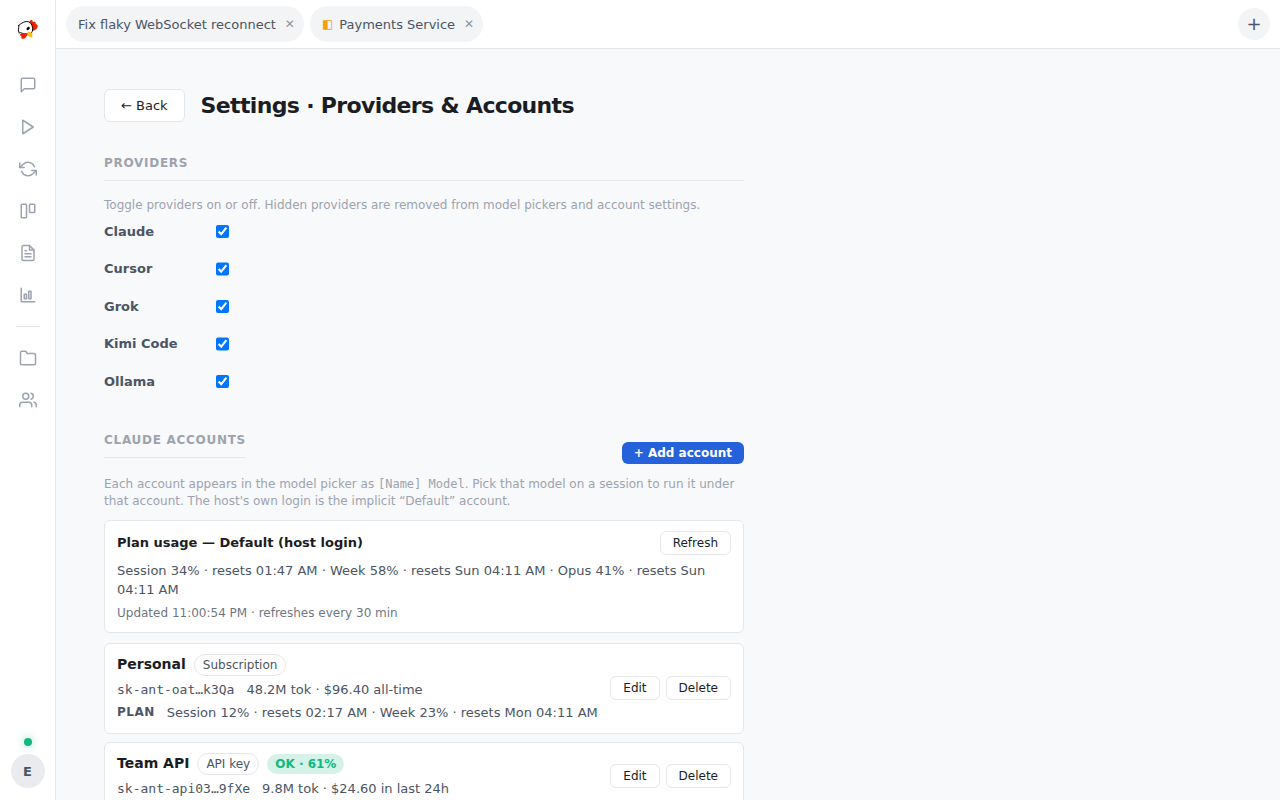
Settings → Providers & Accounts holds each provider’s accounts. Claude, Codex, Grok, and Kimi support multiple accounts; each account’s models appear separately in the picker as [Account Name] Model, with an optional per-account budget and, where the provider reports it, subscription plan usage. The implicit “Default” account is whatever the CLI is signed into on the host. A session’s conversation is pinned to the provider and account it started on — resuming never silently switches either. An hourly keep-alive pings each signed-in login so tokens do not go stale (--keep-alive-hours, 0 disables).
The Providers in Detail
Claude drives the Claude Code CLI in duplex stream-json mode and is the most fully-featured provider: effort levels, thinking, images, resume, and mid-turn message injection (the others queue mid-turn messages for the next turn). It seeds the current Claude catalog (Fable 5, Opus 5 and 4.x, Sonnet 5 and 4.6, Haiku 4.5) with pricing, then live-discovers what your CLI actually offers; Bedrock model ARNs from the standard ANTHROPIC_DEFAULT_*_MODEL environment variables are picked up too. Interrupts are soft — an in-band stop request first, a hard kill only after a grace window.
Codex runs one codex exec --json per turn. Sign-in is the CLI’s own ChatGPT device-code flow, run from Settings → Codex Accounts: create the account, click sign in, enter the one-time code at the URL shown. Supports effort levels, thinking, images, and resume.
Cursor drives cursor-agent in print mode with streamed partial output. Its catalog is whatever cursor-agent models reports — Cursor’s auto and Composer models plus hosted Claude, GPT, Gemini, and Grok variants. Sign in with cursor-agent login on the host; there is no in-app account management. Effort levels are not offered (the CLI has no flag for them), and image attachments are dropped with a notice.
Grok drives the Grok CLI with streamed JSON and a real system-prompt flag. The default model is grok-4.5 — grok-4.6 is offered but needs an OAuth login, not an API key. Sign in from Settings → Grok Accounts (a browser device flow the CLI runs).
Kimi drives the Kimi Code CLI in prompt mode. Models come from the CLI’s own config (kimi provider list); accounts support both a device flow and an API-key account, and the plugin’s settings can inject KIMI_API_KEY and a custom base_url directly.
Ollama talks HTTP to one or more Ollama servers — base_url plus optional named extra servers whose models appear as model@alias. It keeps multi-turn history itself (Ollama is stateless), probes each model’s capabilities before a turn so tool calls and images are only sent where supported, runs MCP tools through an internal tool loop, and prices everything at zero. A model-pull widget in Settings downloads new models to the server.
Mock is the scripted provider the test suite and demos use — each model id is a scenario (mock:happy-path, mock:echo, mock:crash, …) that replays a fixed event sequence with no network and no cost.
CLI locations, model discovery, and per-provider settings
Each CLI provider has a cli_path setting (default: the bare command name, with common install directories like ~/.local/bin probed as fallbacks), a discover_models toggle (default on — the live CLI catalog replaces the built-in seed), and an additional_models list for ids the discovery misses. The App Manager plugin can install Claude Code, cursor-agent, and Ollama; Codex, Grok, and Kimi ship install hints in their settings and error messages.
A provider turn runs under its own budget — default 300 seconds, raised with --provider-send-timeout-secs — rather than the short general plugin-call timeout.
Adding a Provider PeckBoard Does Not Ship
The quickest route is the OpenAI-Compatible Provider plugin: point it at any /v1/chat/completions endpoint (OpenRouter, LM Studio, vLLM, llama.cpp) and its models join the picker. For anything else, a WASM plugin can register a full provider through the provider.register and provider.send hooks — it owns entire agent turns, streams the same events first-party providers do, and can drive either HTTP or a host-managed CLI process. The internal architecture notes in the repository (docs/architecture/providers.md) document the hook contract.