 PeckBoard
Getting Started
PeckBoard is a single server binary that you run on your own machine and open in a browser, or with --desktop in a native window. This page covers the two ways to get that binary — downloading a prebuilt release or building from source — and the first launch: signing in and creating a project.
Download a Release
Each tagged release on the releases page carries one standalone binary per platform, named for the operating system and CPU:
peckboard-linux-x86_64/peckboard-linux-arm64— CLI/server, no WebKitGTK runtime deppeckboard-linux-x86_64-desktop/peckboard-linux-arm64-desktop— same binary plus a native window (--desktop); needslibwebkit2gtk-4.1-0at runtimepeckboard-macos-x86_64/peckboard-macos-arm64— server + desktop (system WebView)peckboard-windows-x86_64.exe/peckboard-windows-arm64.exe— server + desktop (WebView2)
Download the file for your machine. On Linux and macOS it is a bare executable, so mark it as one and run it; on Windows, run the .exe directly:
chmod +x peckboard-macos-arm64
./peckboard-macos-arm64
The web interface, database, and TLS certificate generator are all inside the binary, so there is nothing else to install to run it as a server. Linux --desktop needs the WebKitGTK shared library (libwebkit2gtk-4.1-0 on Debian/Ubuntu). Running agents on Claude models needs the Claude Code CLI — claude installed and signed in on the same machine; the Codex, Grok, Kimi, and Cursor providers drive their own CLIs, Ollama connects to an Ollama server you point it at, and the built-in mock models work with nothing installed at all. The Providers page lists every supported CLI and its sign-in flow.
Download the Remote Agent
The optional peckboard-agent daemon runs on another machine and dials home to your PeckBoard over an outbound WebSocket, so sessions can drive that machine — commands, servers, screenshots, mouse and keyboard — without opening inbound ports. The same releases page ships one agent binary per platform, named peckboard-agent-<os>-<cpu>. Every capability except a connectivity probe is off until you enable it on the machine. Remote Agent walks through verifying, enrolling, permissions, and starting it at boot.
To reach PeckBoard itself from your phone or another computer, see Remote Access.
Build from Source
A source build needs a stable Rust toolchain and Node.js. The frontend is built first because the Rust compiler embeds its output into the binary; scripts/build.sh runs both steps in order:
git clone https://github.com/PeckBoard/peckboard.git
cd peckboard
./scripts/build.sh
./target/release/peckboard
Step-by-step source build
The script is equivalent to running the two builds yourself:
cd web
npm install        # one-time dependency install
npm run build      # writes web/dist/
cd ..
cargo build --release
The frontend build must come first: cargo build --release embeds whatever is in web/dist/ at that moment, and web/dist/ is not checked into git, so skipping the step produces a binary that serves a blank page. The first compile takes a while because SQLite is compiled from source; later builds are incremental. The finished binary at target/release/peckboard is self-contained — the machine that runs it does not need Node.js.
First Launch
On its first start the server creates an admin account and prints the username and password to the terminal in a banner. Copy them — they are shown only once. If they are lost, run the binary again with --reset-password to print a new password; the Configuration page covers accounts, ports, and the data directory in detail.
Open http://localhost:3344 in a browser and sign in with the printed credentials. peckboard --desktop opens a native window on that same URL instead; a first-run desktop launch signs in automatically so the setup wizard appears without a terminal. Linux users who want a launcher icon can run peckboard --install-desktop-entry. The server also listens for HTTPS on port 3345 with a self-signed certificate covering localhost, the loopback addresses, and every address this machine answers on — browsers still warn on the first HTTPS visit for a self-signed cert (only uploading your own certificate under Settings → Administration → TLS / HTTPS removes that warning); plain HTTP is fine for a first look.
Signing in for the first time opens a short setup wizard: set a new password (the printed one is one-time), pick which model providers are visible, choose a default model, register a workspace folder, and review the TLS certificate. It only appears once, on a fresh install, and every step it covers can be redone later from Settings.
The last step is to create a project. A project pairs a folder on your machine with a board of cards — tasks that PeckBoard’s agents pick up and complete. Press + New project, give it a name, the folder it should work in, and a workflow for its cards, and the board appears:
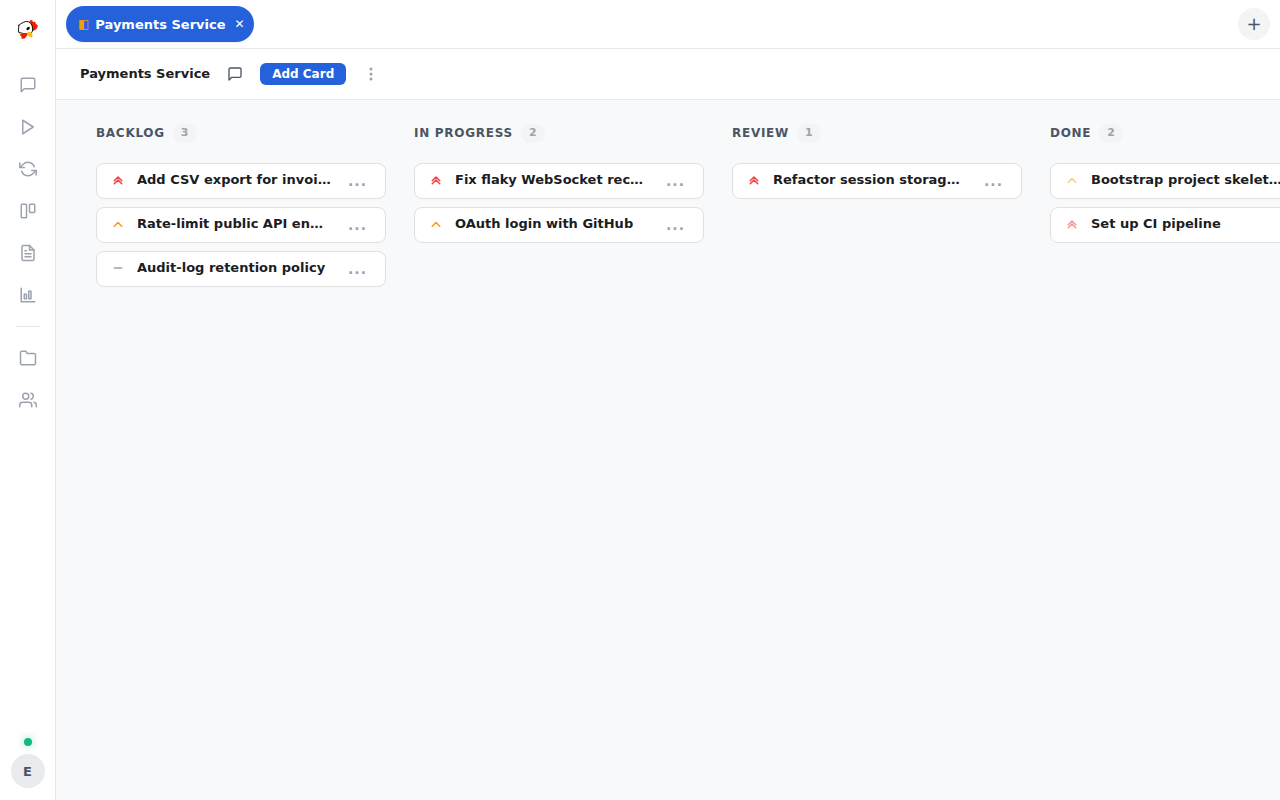
Each column is a step in the project’s workflow, and agents move cards across the board as they finish them. Core Concepts explains how cards, workers, and sessions fit together.
Using the Assistant
Press Listen — the microphone near the bottom of the navigation rail — allow microphone access, and talk: “what’s running?”, “open the storefront project”. Listening needs Chrome, Edge, or Safari (including iPhone and iPad); Firefox has no speech recognition. Browsers only grant the microphone on a secure page, so from another device use the HTTPS port (3345) rather than plain HTTP. The natural Kokoro voice downloads to the server the first time the panel opens; the browser’s own voice speaks meanwhile. Feature Tour covers everything it can do.