 PeckBoard
Playwright Tests
Playwright Tests replays recorded browser test runs the way session-replay products do: the page itself replayed from a DOM recording, a timeline of user events with rage-click detection, the network waterfall with masked request and response detail, the console, session details, and playback that jumps over inactive stretches. A finished replay exports to MP4 with one click, encoded client-side.
Runs recorded by core 0.1.90 or newer carry a continuous DOM recording, which plugin 0.5.0 plays back as the live page inside a browser-window frame sized to the recorded viewport. Styles and images load from their original URLs, so a replay of an app that is no longer running looks unstyled. Older runs stay on the screenshot player. MP4 export still renders the screenshot frames.
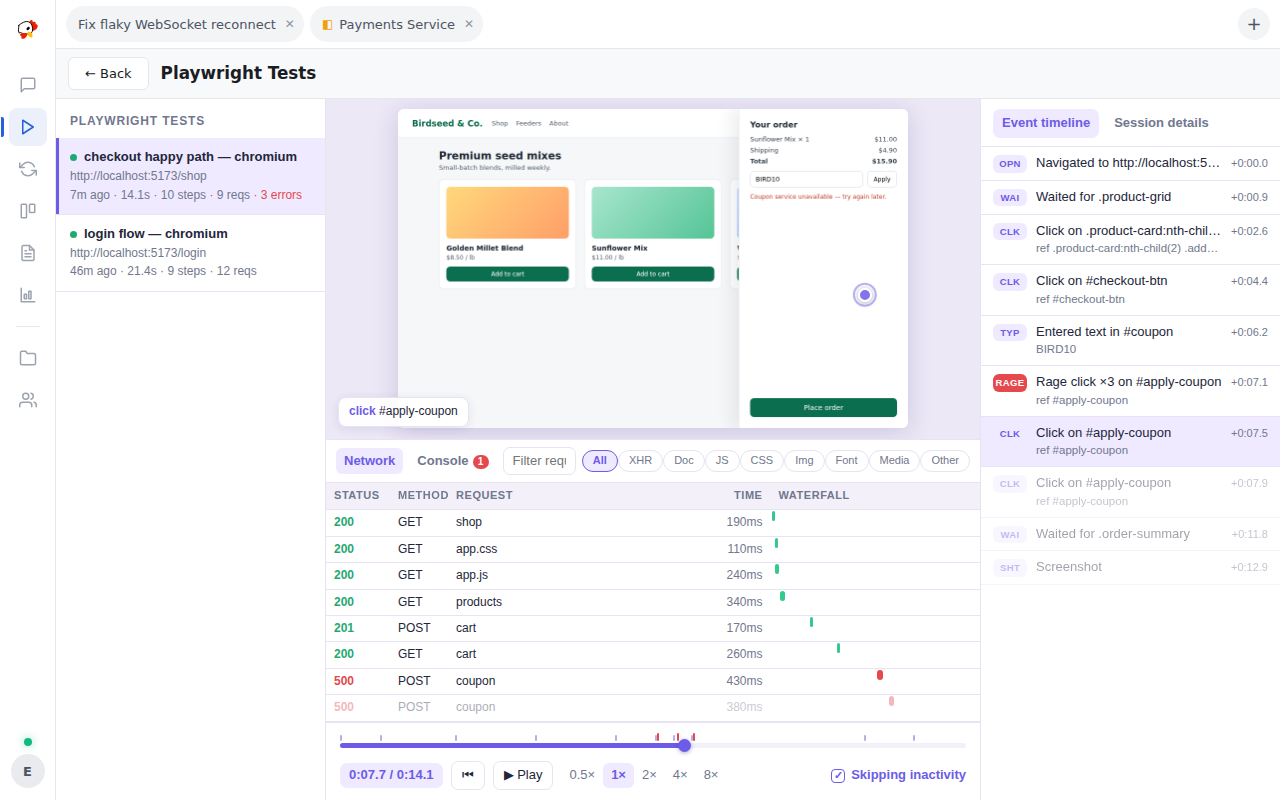
It reads the run recordings PeckBoard’s built-in browser automation writes into the data directory whenever an agent drives the browser_* tools, so there is nothing to configure — runs appear as they are recorded. A browser tool result in chat deep-links straight into the player on that run, and installing the plugin also unlocks the “Hunt for bugs (browser)” preset in the New Session dialog.
Hooks and permissions
Hooks: http.request.before, http.request.authed. Permissions: contribute_sidebar, browser_runs_read, user_authority. No MCP tools and no settings.