 PeckBoard
Graphify
Graphify turns each git repo in a folder into a queryable knowledge graph and points the agent at it, so sessions answer “what is X” and “how does A reach B” from the graph instead of reading files. The graph is built by a deterministic tree-sitter pass — no LLM, no network, no tokens — and a per-repo visualizer page draws it with community clustering and confidence-coded edges.
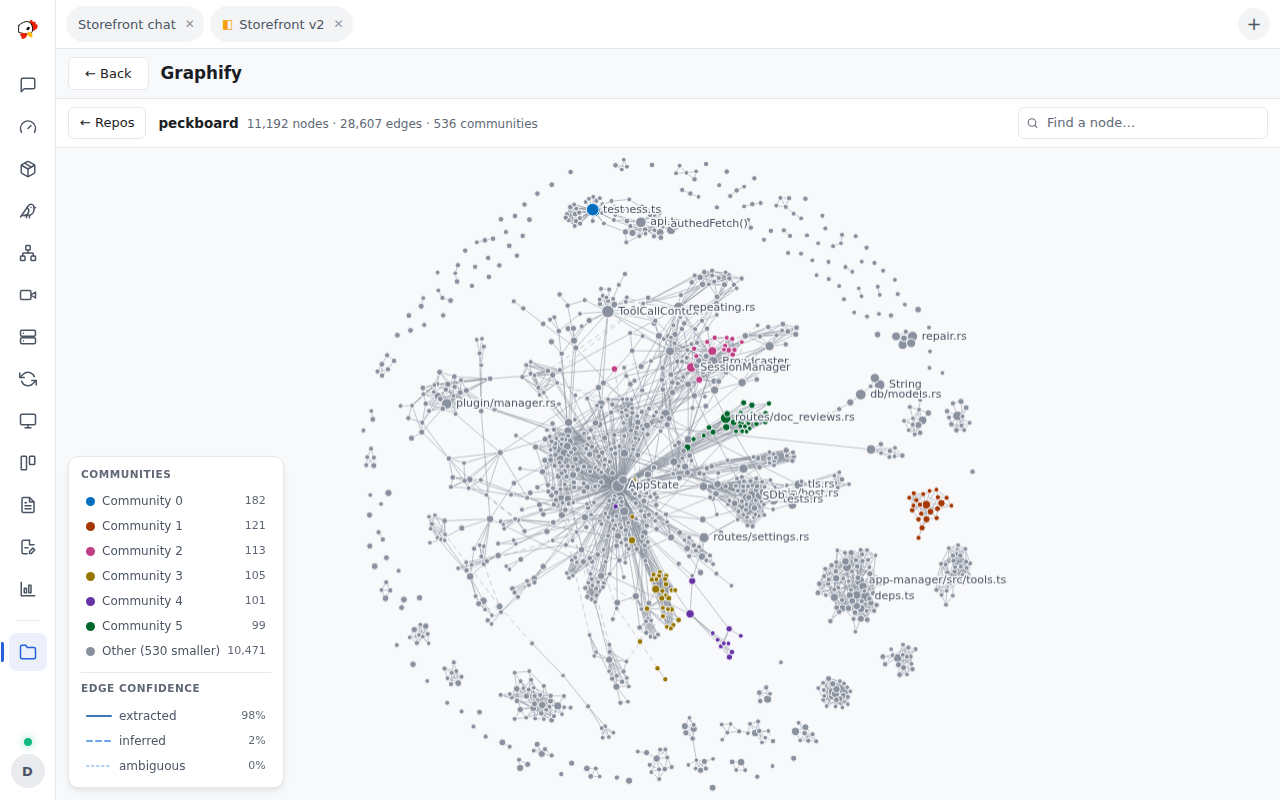
Everything is off until you switch it on: the folder carries a Graphify switch and each repo inside it carries its own, both default off. While a switch is off, every tool refuses and names the switch to flip; the switches are writable only from the page, so an agent can read them but cannot turn itself on. When switched on, the plugin also sets a session system prompt describing the repo’s graph so the agent reaches for the tools first — graphify_path even returns a diagram of the hop chain that the chat renders inline.
| Tool | What it does |
|---|---|
graphify_build |
Builds or refreshes the repo’s graph; incremental by default (per-file hash cache) |
graphify_path |
Shortest path between two concepts, hop by hop with relation and confidence, plus a diagram |
graphify_explain |
One concept: where it is defined, every direct neighbour, its community, and degree rank |
Edges carry a confidence — EXTRACTED (stated in source), INFERRED (deduced), or AMBIGUOUS — and the visualizer keys its dashed edge styles to them in a legend. The page opens from a project, a session, or a folder row on the Folders page, and shows each repo’s node, edge, and community counts, its confidence split, and its highest-degree “god nodes”. The graph is code-only: it parses common source extensions (Python, TypeScript, JavaScript, Go, Rust, Java, C/C++, Ruby, Swift, Kotlin, C#, Scala, PHP) and does not read docs, PDFs, or images.
Installing the graphify engine, settings, and permissions
The graph builder is the graphifyy Python package. When it is missing, every install banner offers an Install from App Manager button that opens the App Manager with the request prefilled (python3, pip, graphifyy), alongside a manual command — nothing installs behind your back. A legacy self-install into a private venv stays behind the off-by-default auto_install setting.
Settings: python_bin (python3 or python, default python3), auto_install (default off), prompt_mode (when_graph_exists, always, or off — whether to set the session system prompt), path_image (default on — return found paths as chat-rendered diagrams), and build_timeout_secs (30–600, default 600).
Hooks: mcp.tool.invoke, http.request.before, http.request.authed, session.message.before (observed only, to sync the system prompt). Permissions: provide_mcp_tools, process_exec, project_files_read, data_store, session_read, session_prompt_write, user_authority, contribute_sidebar.